Documentation Index
Fetch the complete documentation index at: https://v5.rpgjs.dev/llms.txt
Use this file to discover all available pages before exploring further.
Components
Component-based UI layout helpers and component utilities for players. Server-driven components are authoritative descriptions of sprite UI. Built-in helpers such asComponents.text() and Components.hpBar() use RPGJS renderers,
while Components.custom(id, props) targets a CanvasEngine component registered
on the client under sprite.components.
Usage Guide
The server decides which components are displayed and sends a serializable description to every client on the map. The client renders the component and updates dynamic values such as{name}, {hp} or {param.maxHp} when
synchronized player properties change.
Display Name Above The Player
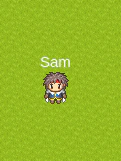
Components.text('{name}') creates a text component. The {name} placeholder
is resolved on the client from the synchronized player property.
Text Style
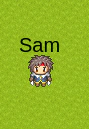
fill,
fontSize, fontFamily, fontStyle, fontWeight, stroke, opacity,
wordWrap and align.
Multiple Lines And Columns
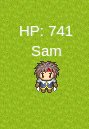
Layout Options
widthandheightdefine the layout box.marginBottommoves atoporbottomcomponent away from the sprite.marginRightmoves aleftcomponent away from the sprite.marginLeftmoves arightcomponent away from the sprite.marginTopcan be used for additional vertical adjustment.
top, left and right are placed outside the sprite graphic bounds, so they
do not cover a graphic that is larger than the hitbox. top is centered on the
graphic. bottom uses the hitbox as its positioning rectangle; a 32x32 shape
inside a 32x32 hitbox matches the hitbox when centered.
HP And SP Bars
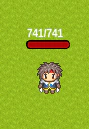
Components.hpBar() reads hp and param.maxHp and uses a red fill by
default. Components.spBar() reads sp and param.maxSp and uses a blue fill
by default. Pass fillColor to override the default color.
Bar Text
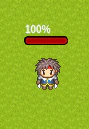
{$current}: current value{$max}: maximum value{$percent}: percentage without the%sign
null to hide it:
Other Positions
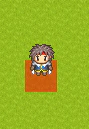
player.removeComponents(position) to remove all components at a position:
Custom Player Properties
Any synchronized player property can be used in placeholders.Custom CanvasEngine Components
Register a reusable CanvasEngine component on the client:Graphic IDs And Legacy Tile IDs
player.setGraphic() accepts a spritesheet id, a legacy tile id, or an array
mixing both:
Components Or Animations
Use server-driven sprite components for persistent UI controlled by the server: name tags, HP bars, guild badges and status icons. UsecomponentAnimations and showComponentAnimation() for temporary effects:
hit numbers, explosions, spell effects and transitions that remove themselves
with onFinish.
Members
- mergeComponents
- mergeComponents
- removeComponents
- removeComponents
- setComponentsBottom
- setComponentsBottom
- setComponentsCenter
- setComponentsCenter
- setComponentsLeft
- setComponentsLeft
- setComponentsRight
- setComponentsRight
- setComponentsTop
- setComponentsTop
- setGraphic
- WithComponentManager
mergeComponents
Merge components with existing components at a specific position Merges new components with existing components at the specified position.- Source:
packages/server/src/Player/ComponentManager.ts - Kind:
method
Signature
Parameters
position:ComponentPositionlayout:ComponentInputoptions?:ComponentLayout
Returns
voidExamples
mergeComponents
Merge components with existing components at a specific position- Source:
packages/server/src/Player/ComponentManager.ts - Kind:
method - Defined in:
IComponentManager
Signature
Parameters
position:ComponentPositionlayout:ComponentInputoptions?:ComponentLayout
Returns
voidremoveComponents
Remove components from a specific position Deletes all components at the specified position.- Source:
packages/server/src/Player/ComponentManager.ts - Kind:
method
Signature
Parameters
position:ComponentPosition
Returns
voidExamples
removeComponents
Remove components from a specific position- Source:
packages/server/src/Player/ComponentManager.ts - Kind:
method - Defined in:
IComponentManager
Signature
Parameters
position:ComponentPosition
Returns
voidsetComponentsBottom
Set components to display below the player graphic Components are displayed below the player’s sprite and can include text, bars, shapes, or any combination. The components are synchronized to all clients on the map.- Source:
packages/server/src/Player/ComponentManager.ts - Kind:
method
Signature
Parameters
layout:ComponentInputoptions?:ComponentLayout
Returns
voidExamples
setComponentsBottom
Set components to display below the player graphic- Source:
packages/server/src/Player/ComponentManager.ts - Kind:
method - Defined in:
IComponentManager
Signature
Parameters
layout:ComponentInputoptions?:ComponentLayout
Returns
voidsetComponentsCenter
Set components to display at the center of the player graphic Components are displayed at the center of the player’s sprite. Be careful: if you assign, it deletes the graphics and if the lines are superimposed.- Source:
packages/server/src/Player/ComponentManager.ts - Kind:
method
Signature
Parameters
layout:ComponentInputoptions?:ComponentLayout
Returns
voidExamples
setComponentsCenter
Set components to display at the center of the player graphic- Source:
packages/server/src/Player/ComponentManager.ts - Kind:
method - Defined in:
IComponentManager
Signature
Parameters
layout:ComponentInputoptions?:ComponentLayout
Returns
voidsetComponentsLeft
Set components to display to the left of the player graphic Components are displayed to the left of the player’s sprite.- Source:
packages/server/src/Player/ComponentManager.ts - Kind:
method
Signature
Parameters
layout:ComponentInputoptions?:ComponentLayout
Returns
voidExamples
setComponentsLeft
Set components to display to the left of the player graphic- Source:
packages/server/src/Player/ComponentManager.ts - Kind:
method - Defined in:
IComponentManager
Signature
Parameters
layout:ComponentInputoptions?:ComponentLayout
Returns
voidsetComponentsRight
Set components to display to the right of the player graphic Components are displayed to the right of the player’s sprite.- Source:
packages/server/src/Player/ComponentManager.ts - Kind:
method
Signature
Parameters
layout:ComponentInputoptions?:ComponentLayout
Returns
voidExamples
setComponentsRight
Set components to display to the right of the player graphic- Source:
packages/server/src/Player/ComponentManager.ts - Kind:
method - Defined in:
IComponentManager
Signature
Parameters
layout:ComponentInputoptions?:ComponentLayout
Returns
voidsetComponentsTop
Set components to display above the player graphic Components are displayed above the player’s sprite and can include text, bars, shapes, or any combination. The components are synchronized to all clients on the map.- Source:
packages/server/src/Player/ComponentManager.ts - Kind:
method
Signature
Parameters
layout:ComponentInputoptions?:ComponentLayout
Returns
voidExamples
setComponentsTop
Set components to display above the player graphic- Source:
packages/server/src/Player/ComponentManager.ts - Kind:
method - Defined in:
IComponentManager
Signature
Parameters
layout:ComponentInputoptions?:ComponentLayout
Returns
voidsetGraphic
Set the graphic(s) for this player Allows setting either a single graphic or multiple graphics for the player. When multiple graphics are provided, they are used for animation sequences. The graphics system provides flexible visual representation that can be dynamically changed during gameplay for different states, equipment, or animations.- Source:
packages/server/src/Player/ComponentManager.ts - Kind:
method - Defined in:
IComponentManager
Signature
Parameters
graphic:string | number | (string | number)[]
Returns
voidExamples
WithComponentManager
Component Manager Mixin Provides graphic and component management capabilities to any class. This mixin allows setting single or multiple graphics for player representation, enabling dynamic visual changes and animation sequences. It also provides methods to display UI components around the player graphic (top, bottom, center, left, right). Components are stored as JSON strings for efficient synchronization.- Source:
packages/server/src/Player/ComponentManager.ts - Kind:
function
Signature
Parameters
Base:TBase